


Scanner Radio - Police Scanner
4.766.49K Reviews
App Specs
- Version
- 8.27
- Updated On
- License
- Free
- Downloads
- 10,000,000+
- Developer
- GordonEdwards.net LLC
- Categories
- News & Magazines
- Platform
- Android, iOS
Screenshots
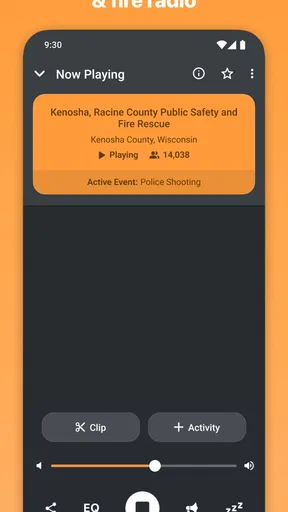
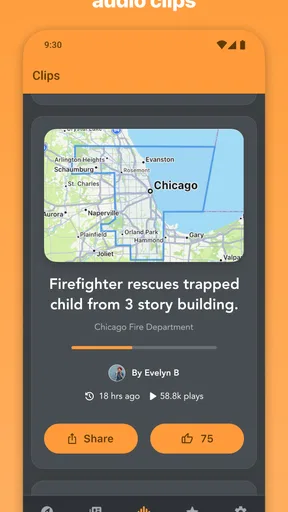
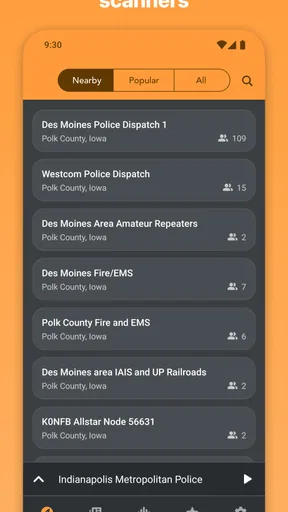
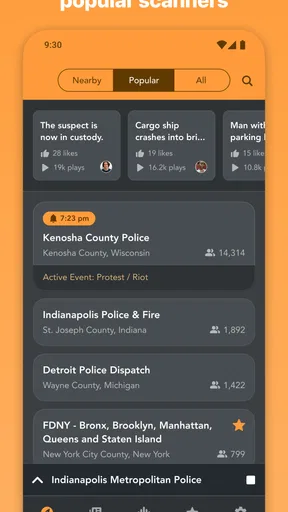
 Analysis by AppCompare
I find a live scanner most useful when it adds context to a developing story, rather than when I expect it to replace a news report. Scanner Radio - Police Scanner lets me listen to public-safety and other radio feeds from a phone, so I can hear activity as it unfolds instead of waiting for a summary. That immediacy is the appeal, but it also calls for patience: radio traffic can be fragmented, technical, and difficult to interpret without local knowledge.
Listening for context, not a complete report
The app’s central strength is its range of live audio. I can look for a feed associated with a location or choose a type of broadcast, then listen to what is being transmitted. That makes it different from the usual news app, where I read edited stories, and from a standard radio station, where a presenter explains what is happening. Here, the value is hearing the underlying activity; the trade-off is that I have to make sense of it myself.
That distinction matters when a feed is busy. A transmission may mention a street, unit, or incident without explaining the wider situation, and I would not treat a brief exchange as confirmation of a rumor. I use scanner audio as one source of context, not as a substitute for official instructions or a clear, verified account. If I need dependable guidance during an emergency, I look to the relevant authorities rather than trying to infer what to do from radio chatter.
Making a useful listening routine
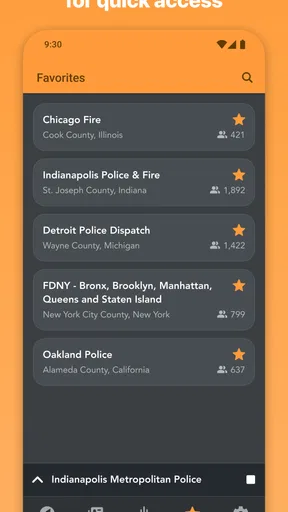
Browsing by location is a sensible first move when I want a local perspective; browsing by feed type works better when I have a particular interest, such as fire or weather radio. Once I find a feed worth revisiting, saving it cuts out repeated searching. My practical tip is to save only the few feeds I expect to use. A long favorites list may look convenient, but it makes it harder to pick the right one quickly when I actually want to listen.
I also treat the listener-count alerts as a prompt to check, not proof that something serious is happening. A sudden jump can signal heightened interest, but it does not explain why people are listening or tell me whether the event affects my street. I open the feed, pay attention to what is actually being said, and then seek a clearer account if the situation matters. That small bit of restraint makes the alert feature more useful and less likely to turn curiosity into unnecessary alarm.
A realistic moment when it earns a place
Imagine hearing that a nearby road is unusually noisy or seeing neighbors discuss an incident. I can open a saved local feed while I’m at home, listen for a little context, and decide whether I should check an official local update or simply carry on. The app does not make that decision for me, and it cannot guarantee that a feed will answer the question I have. Its role is narrower: it gives me another way to follow activity in real time.
That is also why I would not leave a scanner playing all day just to feel informed. Background audio can become noise, and it is easy to miss the meaning of a transmission while doing something else. I get more from a short, deliberate check than from hours of half-listening. If I’m using the app around other people, headphones and a sensible volume help keep the audio from becoming intrusive.
Worth Reading Before You Choose

Flipboard Shows What News Apps Must Do Beyond the Feed

Switching to Android Auto Means Rethinking Your Driving Routine

Google Calendar Makes a Crowded Week Easier to Manage

Ludo King Makes the Most of the Minutes Between Plans

Baby Panda World Brings Quick Play to Modern Phones, but Its Game Library Feels Busy

ESPN’s Live Game View Makes Following Close Games Easier
Getting Started with Scanner Radio
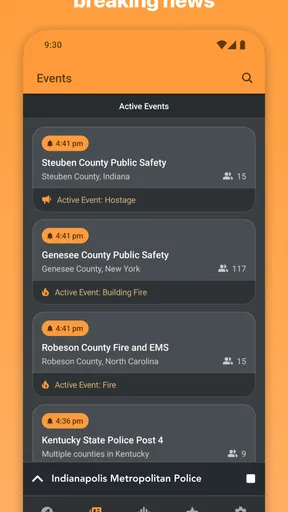
Diving into the app, the first thing you’ll notice is how user-friendly it is. You don’t need to be a tech wizard to figure this one out. Just fire it up, and you’re greeted with a clean interface that makes it easy to find what you’re looking for. You can browse by location or by the type of feed you’re interested in. I found this super handy because sometimes you just want to know what’s happening locally, while other times you might be in the mood for something more random.
A World of Feeds at Your Fingertips
One of the coolest features of Scanner Radio - Police Scanner is the sheer variety of feeds available. We’re talking over 7,000 feeds, covering everything from police and fire departments to air traffic and marine channels. It’s like having a backstage pass to the world. If there’s something going on, you’re likely to find it here.
You can also save your favorite feeds for quick access later, which is a nice touch. I found myself frequently checking back on my hometown’s police scanner just to stay in the loop.
Alerts and Notifications
This app also comes with an alert system that notifies you when a scanner reaches a certain number of listeners. This usually means something big is going down, and you’ll want to tune in. It's like your own personal news alert system, keeping you informed about major events as they unfold. Pretty neat, right?
I’d soften that expectation in practice: a crowded feed tells me it has attracted attention, not what has happened. Listener activity can be a useful nudge to open the audio, but I still need to listen carefully and check a reliable local news or public-agency source before drawing conclusions. If alerts make me anxious or tempt me to keep checking my phone, I would rely on saved feeds when I choose to listen rather than treat every notification as urgent.
Sound Quality and Performance
The sound quality is surprisingly good for a streaming app. I didn’t experience any annoying lags or drops in the audio, which is crucial when you’re trying to catch every detail of a live transmission. Plus, the app runs smoothly without any hiccups, so you can keep those feeds running in the background while you go about your day.
As with any live audio stream, I would keep my expectations measured: reception and usefulness depend on the feed and the connection available at the time. If a transmission cuts out, or the audio is hard to follow, switching to another feed or checking a written news update may be more productive than waiting for a perfect replay. The app is best when listening is convenient, not when I need a guaranteed, uninterrupted account.
Who will get the most from it
I can see this working particularly well for people who follow local events, aviation or emergency-response activity as a hobby, and for curious listeners who enjoy unscripted audio. It is also handy for someone who has moved to a new area and wants to explore what kinds of feeds are available nearby. The fact that GordonEdwards.net LLC makes this app, which sits in the News & Magazines category, fits its role as a listening companion to other news sources rather than a conventional headline reader.
It is less suitable for anyone who wants a polished, plain-language explanation of breaking events, a guaranteed alert about every local incident, or a substitute for emergency services. A news app is usually the better choice for concise reporting and background; official public-safety channels are the better choice for instructions. Scanner listening rewards curiosity and attention, but it asks the listener to tolerate gaps and uncertainty.
Cost, compatibility, and a sensible first try
The app is free to download and is rated for Everyone. It has a 4.7 average from around 479,000 ratings, with more than 10 million installs, so it has clearly found a substantial audience. Optional in-app purchases range from $2.99 to $39.99 per item; I would start with the free experience and decide whether I need anything beyond it before spending. The current version is 8.20, and it requires Android 10 or later, so checking that requirement before installing can save time.
For a first session, I would search for one nearby feed, listen long enough to understand its pace, and save it only if I expect to return. Then I would try a different category to see whether the app’s broader range suits my interests. That gives a fair impression without turning the app into a constant source of noise. Its release date, Apr 25, 2010, also reflects a long-running product, though what matters day to day is whether the feeds I care about are useful to me.
Conclusion
In a world where information is power, having a tool like Scanner Radio - Police Scanner at your disposal is pretty awesome. Whether you’re a news junkie, a concerned citizen, or just curious, this app offers a fascinating glimpse into the real-time happenings in your area and beyond. So if you're looking for a way to stay informed and maybe even a little entertained, give this app a whirl. You might just find yourself hooked!
My recommendation comes with one important qualification: I would use it for direct listening and curiosity, not as my sole source for important decisions. The best experience comes from choosing a relevant feed, keeping alerts in perspective, and pairing what I hear with clear reporting when accuracy matters. If that kind of open-ended listening sounds appealing, this is an engaging way to explore live radio from a phone; if I want quick answers with no interpretation required, I would reach for a news report instead.
Pros
- Wide variety of channels available.
- User-friendly interface for easy navigation.
- Real-time alerts for important broadcasts.
- Customizable channel favorites list.
- Low battery consumption during use.
Cons
- Occasional audio buffering issues.
- Ads can be intrusive at times.
- Limited offline functionality.
- Some channels may be inactive.
- Requires stable internet connection.
FAQs for Scanner Radio - Police Scanner
What features does Scanner Radio - Police Scanner offer?
Scanner Radio - Police Scanner provides live audio streams from police, fire, and emergency medical services around the world. Users can listen to feeds from their local area or explore other regions. The app also offers notifications for major incidents, customizable layouts, and the ability to record audio for later playback.
Is Scanner Radio - Police Scanner free to use, or are there in-app purchases?
The app is free to download and use, but it offers in-app purchases and a premium version. The premium upgrade removes ads, provides access to additional features like sleep timers, and allows for more customization. Users can choose to upgrade for an enhanced listening experience.
How can I customize my listening experience in the app?
Users can customize their experience by choosing from a variety of feeds, setting favorite channels for quick access, and configuring alerts for major events. The app allows users to create a personalized layout and adjust settings to suit their listening preferences, ensuring a tailored experience.
Are there any privacy concerns with using Scanner Radio - Police Scanner?
Scanner Radio - Police Scanner streams publicly available radio feeds, so it doesn’t access private conversations or sensitive information. However, users should be aware of their local laws regarding the use of police scanners and ensure they are complying with any regulations when using the app.
Can I use Scanner Radio - Police Scanner offline?
No, Scanner Radio - Police Scanner requires an internet connection to stream live audio feeds. Users will need either a Wi-Fi connection or mobile data to access the app’s features. Offline use is not supported, as the app relies on real-time streaming of emergency services communications.


